How to Wear and Setup Hume Health Band 2.0 Correctly: Guide
Wearable health technology has changed the way people understand their daily habits, recovery patterns, sleep quality, and overall wellness.
The Hume Health Band 2.0 is a longevity-focused wearable that continuously collects health data and translates it into clear insights through the Hume Health app.
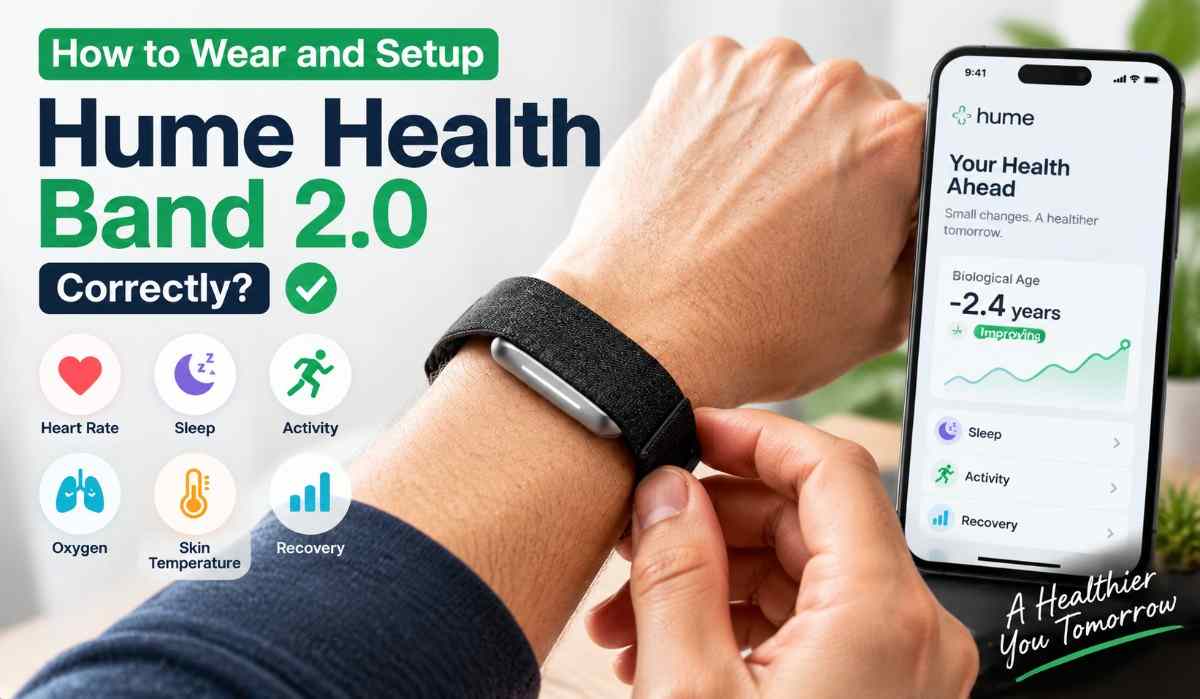
The Band 2.0 includes heart rate tracking, HRV monitoring, blood oxygen levels, skin temperature insights, sleep analysis, activity tracking, recovery measurements, and metabolic health insights.
Wearing and setting up the band correctly matters because proper positioning, app connection, and daily use help ensure consistent tracking. A wearable provides useful trends only when you wear it correctly and use it regularly.
 Get Hume Health Band 2.0 at the Lowest Price Today!
In this guide, we explain how to wear, connect, and set up the Hume Health Band 2.0 correctly for the best experience.
What Is Hume Health Band 2.0?
The Hume Health Band 2.0 is a smart health wearable designed to monitor different body signals and provide personalized wellness insights. Unlike traditional fitness trackers that mainly focus on steps and exercise, Hume focuses on understanding broader health patterns.
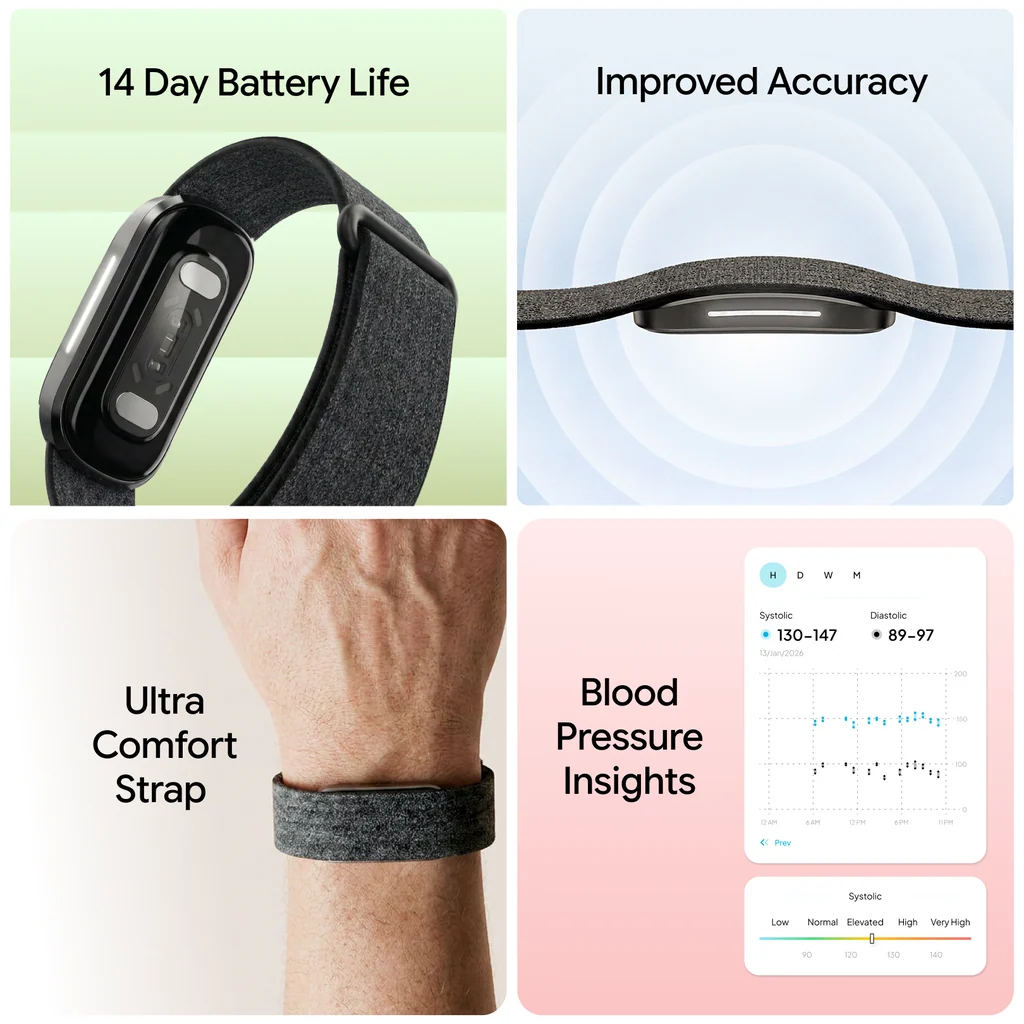
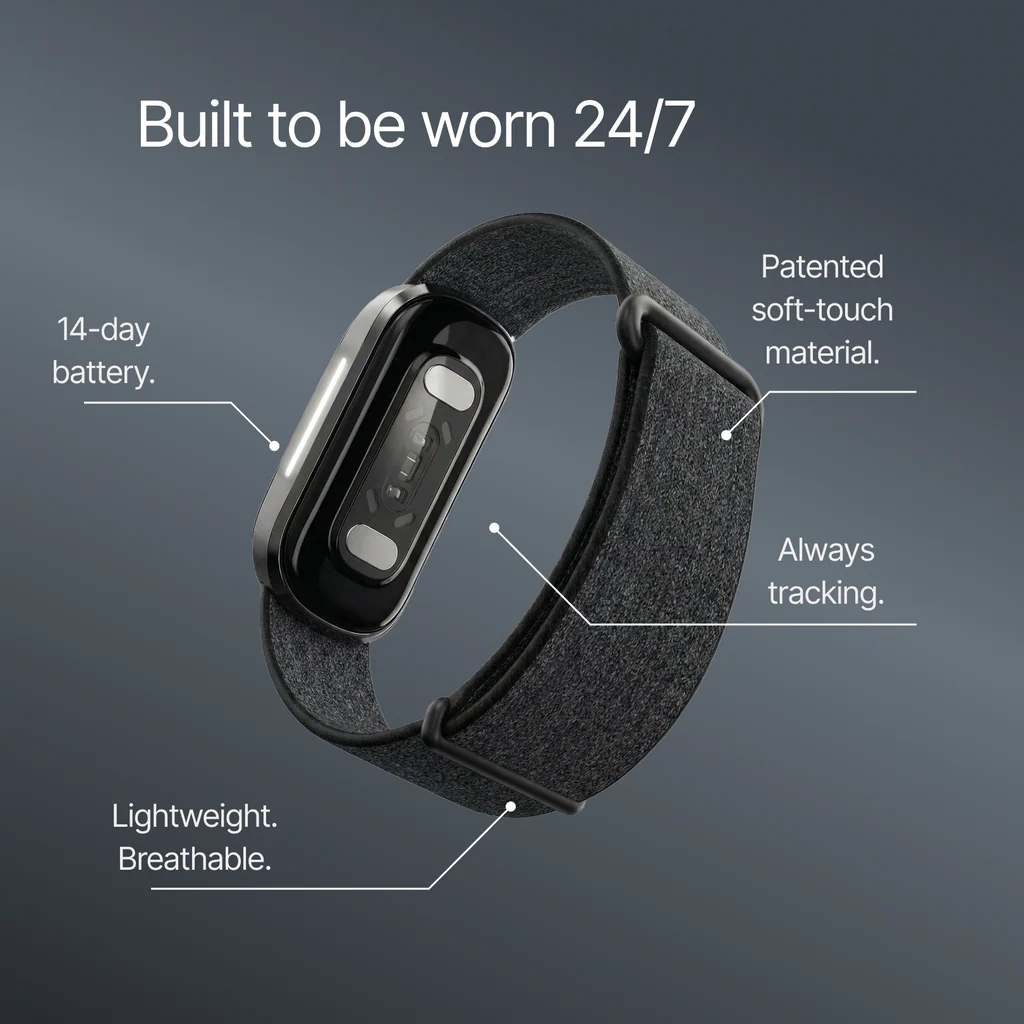
The company describes Band 2.0 as a wearable that provides advanced health insights, personalized coaching, and long-term wellness tracking. The device includes up to 14 days of battery life and features designed for continuous health monitoring.
The band works together with the Hume Health app, where users can view their health trends and understand how daily behaviors affect recovery, sleep, energy, and overall wellness.
Key areas tracked by the Hume Health Band 2.0 include:
- Heart rate and activity levels
- Heart rate variability (HRV)
- Blood oxygen levels (SpO2)
- Sleep stages
- Skin temperature
- Recovery status
- Strain and movement patterns
- Metabolic health insights
The goal isn’t just to collect numbers, but to help users recognize patterns and make more informed lifestyle decisions.
Before Wearing Your Hume Health Band 2.0
Before placing the band on your wrist, prepare the device properly. Taking a few minutes during the first setup can prevent connection issues and improve the overall experience.
Before starting:
- Make sure the band is charged
- Download the Hume Health app
- Enable Bluetooth on your smartphone
- Create or sign in to your Hume account
- Keep your phone close to the band during setup
The Hume Band 2.0 is designed for everyday wear, allowing users to continuously monitor important wellness signals throughout the day and night.
A fully charged device also helps avoid interruptions during important tracking periods, especially overnight sleep monitoring.
Get Hume Health Band 2.0 at the Lowest Price Today!
How To Wear Hume Health Band 2.0 Correctly?
Correct placement is one of the most important parts of using any health wearable. The sensors need proper contact with your skin to collect consistent readings.
Follow these steps:
1. Choose the Correct Wrist
The Hume Health Band 2.0 can be worn on either wrist depending on personal comfort.
Most users choose their non-dominant hand because it usually experiences less movement during daily activities.
For example:
- Right-handed users often prefer the left wrist
- Left-handed users often prefer the right wrist
The best choice is the wrist where you can comfortably wear the band throughout the day and night.
2. Position the Band Above the Wrist Bone
Place the band slightly above your wrist bone rather than directly on the joint.
The correct position should:
- Sit flat against your skin
- Allow the sensors to maintain contact
- Feel secure without being uncomfortable
Avoid wearing it too loosely because excessive movement can affect sensor contact.
However, do not tighten it too much. The band should allow normal wrist movement and remain comfortable during sleep, exercise, and daily activities.
3. Adjust the Strap Comfortably
A proper strap fit helps maintain reliable readings while keeping the device comfortable for long-term wear.
The ideal fit should be:
- Snug enough that the band does not slide around
- Loose enough to allow natural movement
- Comfortable during workouts and sleep
Since the Hume Band 2.0 is designed for continuous tracking, comfort matters because users may wear it throughout the day and overnight.
The official information highlights that the band is designed for comfortable 21/7 tracking with advanced sensors.
How To Turn On and Connect Hume Health Band 2.0?
After wearing the band correctly, the next step is to connect it to the Hume Health app.
Follow the setup process:
Step 1: Download the Hume Health App
Install the official Hume Health application from your smartphone’s app store.
The app is the main platform for viewing your wearable data, including health trends, reports, and personalized insights.
Step 2: Create Your Account
Open the app and complete the account setup process.
You may need to provide basic information so the app can personalize your experience and display relevant health insights.
Step 3: Pair Your Band
Turn on Bluetooth and follow the instructions inside the app to connect your Hume Band 2.0.
During pairing:
- Keep the band near your phone
- Make sure Bluetooth is enabled
- Allow required permissions
- Wait until the connection is complete
Once connected, the app will begin receiving information from the wearable.
Setting Up Your Hume Health Profile
After connecting the band, completing your profile helps create a more personalized experience.
Review your account information and ensure your details are accurate.
Important profile settings may include:
- Age
- Height
- Weight
- Activity information
- Personal wellness goals
Accurate information allows the app to better understand your health trends and provide more relevant insights.
The Hume ecosystem connects different health measurements into one view, helping users understand how habits influence overall wellness.
Get Hume Health Band 2.0 at the Lowest Price Today!
Understanding Your First Hume Band 2.0 Data
After setup, the band begins collecting information as you wear it.
New users should remember that meaningful trends usually require consistent usage. A single day of data may not represent your normal patterns.
Get Hume Health Band 2.0 at the Lowest Price Today!
During the first days, focus on:
- Wearing the band consistently
- Checking app insights regularly
- Understanding your normal baseline
- Reviewing changes over time
The Hume Band 2.0 is designed to track trends, not just isolated measurements. The official description says it continuously monitors biomarkers to show how habits affect the body.
How To Use the Hume Health App After Setup?
Once your Hume Health Band 2.0 is connected and positioned correctly, the next step is learning how to use the app effectively. The app acts as the central dashboard where your wearable data is converted into simple health insights.
Instead of checking individual numbers separately, Hume combines measurements to help users understand overall trends in recovery, sleep, activity, and daily habits.
The official Hume experience connects different biomarkers into one complete health picture, helping users understand how lifestyle choices influence their body over time.
A simple daily routine can help users get the most value from the Band 2.0.
Recommended routine:
- Wear the band consistently throughout the day
- Open the Hume app regularly
- Review health trends instead of focusing on one reading
- Follow personalized insights provided in the app
- Track changes over weeks and months
Morning Check Routine With Hume Band 2.0
A good habit is checking your Hume Health app each morning after waking up.
Overnight, the band collects key information about sleep and recovery. Reviewing these insights can help you understand how your body responded to the previous day.
Your morning review may include:
➺ Sleep Insights
Sleep tracking helps users understand sleep patterns, including different sleep stages and overall recovery quality.
The Hume Band 2.0 analyzes sleep information using algorithms that help users understand how well their body recovered overnight.
➺ Recovery Status
Recovery information helps users understand whether their body is ready for higher activity levels or needs more rest.
Factors such as sleep, activity, and daily strain help you understand your recovery trends.
➺ Daily Capacity
The app helps users understand how much stress or activity their body can handle during the day.
The official Hume information explains that metabolic capacity insights help users understand strain, recovery, and readiness instead of simply guessing their daily performance level.
Get Hume Health Band 2.0 at the Lowest Price Today!
Common Mistakes When Wearing Hume Health Band 2.0
Even though the setup process is simple, some common mistakes may affect comfort and tracking consistency.
➺ Wearing the Band Too Loose
A loose strap may allow excessive movement, reducing consistent contact between the sensors and your skin.
Better approach:
- Adjust the strap until it stays secure
- Avoid excessive sliding during movement
- Check the fit before sleep or exercise
➺ Wearing It Too Tight
A very tight band may become uncomfortable during long-term use.
The correct fit should feel secure but natural.
Signs the band may be too tight:
- Skin discomfort
- Pressure marks
- Reduced comfort during sleep
➺ Removing It Too Frequently
The Hume Band 2.0 is designed for continuous tracking, so removing it too often may create gaps in your health trends.
For the most complete picture:
- Wear it during normal daily activities
- Keep it on during sleep
- Remove only when necessary for charging or cleaning
The official setup approach is simple: wear the band, check the app, follow personalized recommendations, and track progress over time.
How to Charge the Hume Health Band 2.0 Properly
Battery management is another important part of maintaining a consistent tracking routine.
The Hume Band 2.0 is designed with up to 14 days of battery life, allowing users to wear the device longer between charges.
Charging tips:
- Charge the band before the battery reaches zero
- Use the recommended charging accessories
- Avoid leaving the device unused for long periods
- Fully charge before travel or busy schedules
A regular charging routine prevents interruptions in health tracking.
Cleaning and Maintaining Your Hume Band 2.0
Since the band stays close to your skin for extended periods, basic maintenance helps keep it comfortable.
Simple care steps:
- Clean the band regularly with a soft cloth
- Remove sweat or moisture after intense workouts
- Keep the sensor area free from dirt
- Allow the device to dry before wearing again
Avoid using harsh chemicals that may damage the band materials.
Regular cleaning is especially helpful for users who wear the device during exercise, outdoor activities, and sleep.
Best Practices For Accurate Hume Band 2.0 Tracking
To get better long-term insights, consistency matters more than occasional use.
Follow these best practices:
- Wear It Daily: Health trends become more meaningful when the device collects information regularly.
- Keep Your Profile Updated: Make sure your personal information in the app stays accurate.
- Review Trends Instead of Single Results: Daily changes can happen naturally. Looking at longer patterns provides a clearer understanding of your habits.
- Use Insights to Improve Habits: The purpose of the Hume Band 2.0 is not only measurement but helping users understand connections between lifestyle choices and wellness.
The official product information explains that Hume connects health measurements together so users can understand how nutrition, body composition, and other health factors work together.
Get Hume Health Band 2.0 at the Lowest Price Today!
Final Setup Checklist For New Hume Band 2.0 Users
Before starting regular use, check that everything is completed:
✅ Band is fully charged
✅ Hume Health app is installed
✅ Account setup is complete
✅ Bluetooth connection is active
✅ Band fits comfortably on your wrist
✅ Notifications and permissions are enabled
✅ Personal information is updated
✅ Daily wearing routine has started
The Hume Band 2.0 is designed to become part of a long-term wellness routine. Correct wearing, proper setup, and consistent app use help users better understand their personal health trends.
By following the setup process and using the band regularly, users can get a clearer view of daily habits, recovery patterns, sleep quality, and overall wellness progress.
Final Thoughts: Is Hume Health Band 2.0 Worth Using?
The Hume Health Band 2.0 is designed for users who want deeper insights beyond basic fitness tracking. It combines health measurements like sleep, recovery, activity, and body signals into one easy-to-understand view.
Proper setup and consistent wear are key to getting reliable results. A comfortable fit, regular charging, and daily app usage help the band track meaningful health trends.
Unlike simple activity trackers, Hume focuses on long-term wellness by showing how daily habits may affect recovery, energy, and overall health patterns.
Overall, the Hume Health Band 2.0 is worth considering for people interested in proactive health tracking and longevity insights. Using it consistently can help users better understand their body and make smarter wellness decisions.

Click to Learn More About Hume Band 2.0
About Us